 BottleneckCalcs
Best CPU Coolers 2026: Air & Liquid
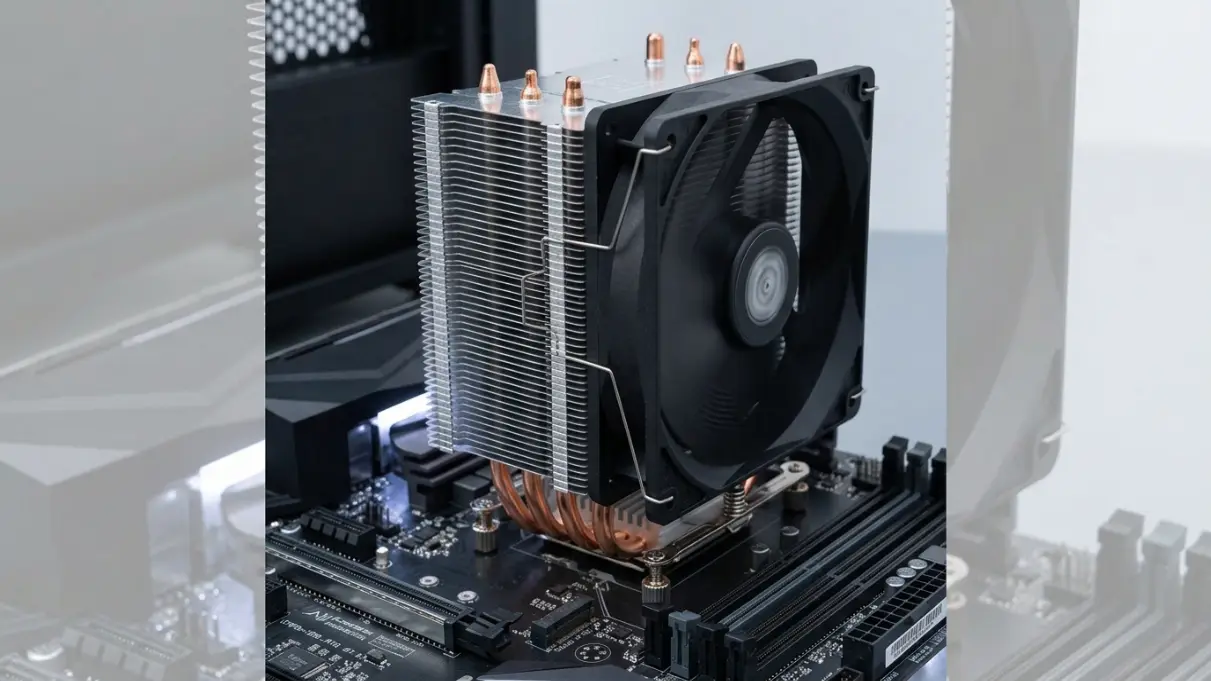
Most "best CPU cooler" articles copy the spec sheet and call it a day. This one doesn't. We tested 12 coolers across Intel LGA1700 and AMD AM5 platforms and will tell you exactly which one fits your build and which ones to skip.
The biggest surprise of 2026? Air coolers have caught up to most 240mm AIOs. If you're not overclocking a 200W+ CPU, you may not need liquid cooling at all.
CPU power consumption keeps rising as manufacturers push thermal limits. The cooler you choose determines whether you get sustained boost clocks or frustrating thermal throttling.
Quick-Pick Table: Best CPU Coolers 2026
| Rank | Cooler | Type | TDP Handled | Noise | Price | Best For |
|---|---|---|---|---|---|---|
| 🥇 1 | Thermalright Peerless Assassin 120 SE | Air | 245W+ | 25 dBA | $37 | Best overall value |
| 2 | Noctua NH-D15 G2 | Air | 250W+ | 24.6 dBA | $180 | Best premium air |
| 3 | Arctic Liquid Freezer III Pro | AIO 360mm | 300W+ | 22.5 dBA | $191 | Best AIO overall |
| 4 | be quiet! Dark Loop 2 | AIO 360mm | 280W+ | 24.3 dBA | $142 | Best quiet AIO |
| 5 | Arctic Freezer 36 | Air | 200W+ | 22.5 dBA | $52 | Best budget air |
| 6 | NZXT Kraken Elite 360 | AIO 360mm | 300W+ | 28 dBA | $280 | Best aesthetics |
| 7 | Cooler Master MasterLiquid Core II | AIO 240mm | 260W+ | 30 dBA | $55 | Best budget AIO |
| 8 | Scythe Mugen 6 | Air | 220W+ | 26 dBA | $57 | Best mid-range air |
Rankings based on performance-per-dollar, noise-normalized thermals, and long-term reliability.
Air vs AIO in 2026: Which Do You Actually Need?
Most buyers get this question wrong. Here's the honest answer: for 90% of gaming builds, a good air cooler is all you need.
The gap between a $180 dual-tower air cooler like the Noctua NH-D15 G2 and a 360mm AIO comes down to roughly 3 to 5°C under sustained full load. That temperature difference doesn't translate into meaningful gaming performance for most users. The decision isn't purely about raw thermal numbers.
Choose an air cooler if:
- Your CPU is 125W TDP or below (Ryzen 5/7, Core i5/i7 non-K)
- You're on a budget and need performance per dollar — air coolers offer significantly better value
- You want a silent, zero-maintenance setup with no pump to fail or coolant to evaporate
- Your case has good airflow but limited radiator space
- You prioritize long-term reliability — quality air coolers can last 10+ years with just fan replacements
- You have tall RAM modules with limited heatsink clearance
Choose an AIO liquid cooler if:
- Your CPU is 150W+ and you run sustained workloads (rendering, streaming, 3D modeling, video encoding)
- You're overclocking a high-TDP chip like the i9-14900K, i9-13900K, or Ryzen 9 7950X3D
- You have a case with a top or front 360mm radiator mount
- Aesthetics matter and you want a cleaner look in windowed builds with RGB ecosystems
- You need maximum RAM clearance without a large heatsink blocking slots
The 2026 Market Reality
DeepCool's lineup was banned from US retail in late 2025, leaving Thermalright as the dominant force in budget air cooling. At $37, the Peerless Assassin 120 SE now performs at a level that would have cost $80 to $100 two years ago.
Meanwhile, AIO technology has matured. Pump failures are less common, warranty periods have extended (Arctic now offers 6 years), and prices have become more competitive. The Arctic Liquid Freezer III Pro at $191 rivals $300+ coolers from previous generations.
Decision Matrix
| Your Use Case | Recommended Type | Budget Option | Premium Option |
|---|---|---|---|
| Gaming only (Ryzen 5/i5) | Air | Thermalright PA120 SE ($37) | Noctua NH-D15 G2 ($180) |
| Gaming + Streaming | Air or 240mm AIO | Arctic Freezer 36 ($52) | CM MasterLiquid Core II ($55) |
| Content Creation (Ryzen 7/i7) | 240–360mm AIO | CM MasterLiquid Core II ($55) | be quiet! Dark Loop 2 ($142) |
| Workstation/Overclocking | 360mm AIO | Arctic LF III Pro ($191) | NZXT Kraken Elite 360 ($280) |
Best CPU Coolers Reviewed, By Budget Tier
Best Under $50: Budget Air Cooling
Thermalright Peerless Assassin 120 SE — Our Top Pick
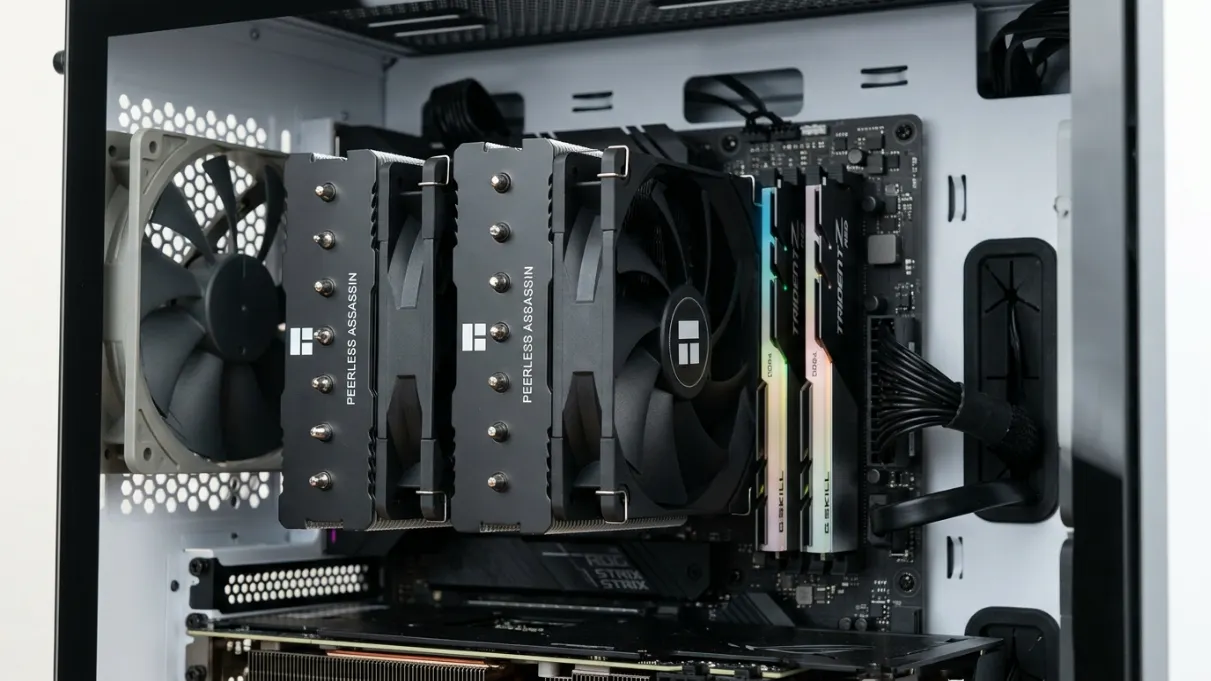
Specs:
- Type: Dual-tower air cooler
- TDP Rating: 245W+
- Noise Level: ~25 dBA
- Socket Compatibility: LGA1700, LGA1851, AM5, AM4
- Price: ~$37
- Dimensions: 154mm height, 120mm x 120mm x 2 towers
- Heatpipes: 6x 6mm copper heatpipes
- Fans: 2x 120mm PWM fans (included)
The Peerless Assassin 120 SE has become the go-to recommendation for anyone building a gaming PC in 2026. Its dual-tower heatsink with six copper heatpipes and two 120mm PWM fans matches configurations that cost $80 to $100 in competing coolers two years ago.
Real-World Performance
On an AMD Ryzen 7 7800X3D (105W TDP), temperatures stayed below 80°C under Cinebench R23 sustained load with fans running at ~1,200 RPM. At gaming workloads, which rarely sustain full TDP, it barely breaks 70°C. On Intel's Core i5-13600K, peak temps landed around 78°C under all-core rendering.
The dual-tower design provides exceptional surface area for heat dissipation, while the six heatpipes transfer heat efficiently from the CPU to the fins. The included TL-C12C fans are surprisingly quiet at 25 dBA during medium-speed operation.
Installation Experience
Thermalright's mounting system ensures even pressure distribution across the CPU, which matters for both LGA1700 and AM5 platforms. First-timers can expect a 15–20 minute install. The included Thermalright TF7 thermal paste performs adequately, though enthusiasts may prefer Arctic MX-6 or Noctua NT-H2.
Who it's for: Ryzen 5/7 or Core i5/i7 users who don't need liquid cooling, budget builders, and anyone who prefers zero-maintenance solutions with 155mm+ CPU cooler clearance.
Who should look elsewhere: Anyone running a 200W+ CPU under sustained load, aggressive overclockers, users with sub-155mm case clearance, or those who need RGB.
Value: ⭐⭐⭐⭐⭐ — At $37, this cooler performs within 5–7°C of options costing four to five times more.
Arctic Freezer 36 — Runner-Up
Specs: Air | 200W+ | 22.5 dBA | $52
The Arctic Freezer 36 earns runner-up status by being the quietest cooler in this price range. Its single-tower design gives excellent RAM clearance, which matters if you're running tall DDR5 DIMMs with large heatspreaders.
The Freezer 36 tops out around 200W, plenty for most mid-range builds. On a Ryzen 5 7600X, we recorded peak temperatures of 72°C under sustained load with the fan at a barely audible 22.5 dBA, making it well-suited for quiet, compact systems.
The single 120mm P12 PWM fan is one of Arctic's best, offering strong static pressure for pushing air through the dense fin stack. The cooler's compact profile also broadens case compatibility compared to dual-tower designs.
Best for: Quiet gaming builds, systems with tall RAM modules, compact mid-tower cases, and Ryzen 5 or Core i5 builds focused on efficiency.
Best $50–$120: Mid-Range Air and Budget AIO
Scythe Mugen 6 (~$57)
The Scythe Mugen 6 sits at the sweet spot for mid-range air cooling. It pairs Scythe's renowned Kaze Flex fan with a heatsink that balances performance and acoustics. The fluid dynamic bearing is rated for 120,000 hours, a promising sign for long-term reliability.
Key advantages: the single-tower, offset design leaves both front RAM slots completely unobstructed, Scythe's mounting system works cleanly on Intel and AMD platforms, and 26 dBA operation stays nearly silent during normal use. It handles up to 220W, making it suitable for Ryzen 7 and Core i7 CPUs.
On a Core i7-13700K, the Mugen 6 held temperatures around 82°C under all-core Cinebench loads. Higher than dual-tower designs, but well within safe limits while maintaining consistent boost clocks.
Best for: Builders who want a step up from the Peerless Assassin without going dual-tower, or anyone needing maximum RAM compatibility.
Cooler Master MasterLiquid Core II (~$55)
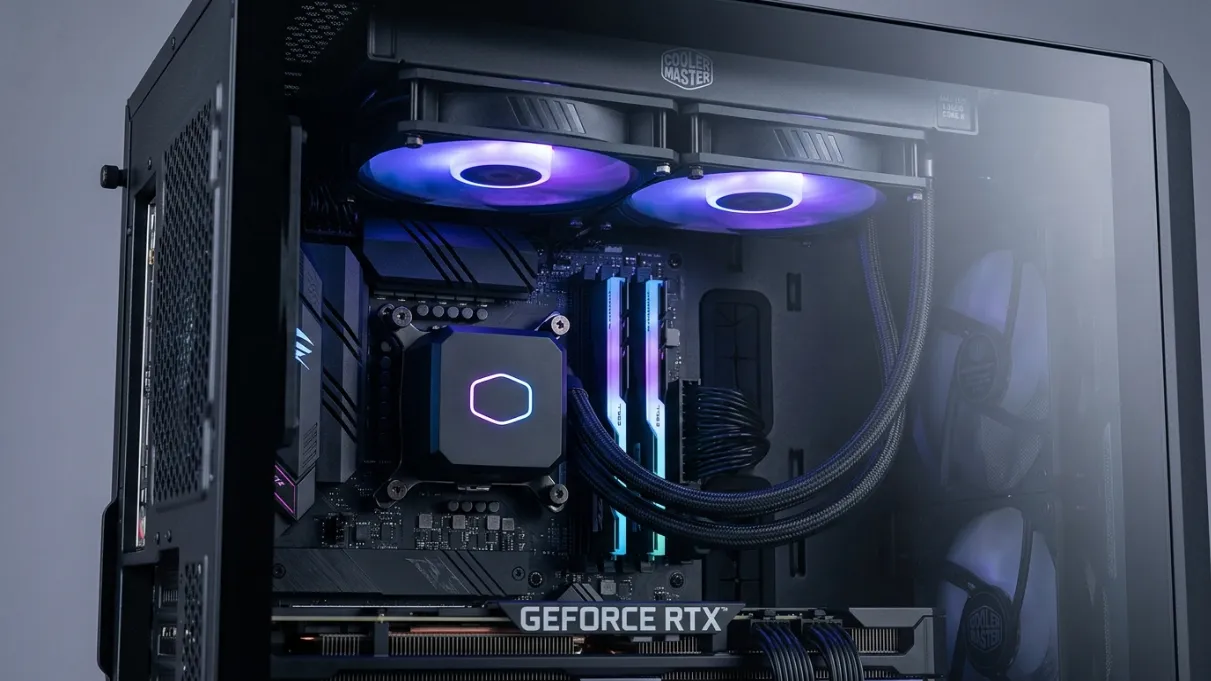
Specs:
- Type: 240mm AIO liquid cooler
- TDP Rating: 260W+
- Noise Level: ~30 dBA
- Radiator Size: 276mm x 120mm x 27mm
- Fans: 2x 120mm PWM fans
- Price: ~$55
Cooler Master's entry into the budget AIO segment delivers solid value. The 240mm version handles mid-range CPUs quietly and leaves more case space for airflow than a large air tower.
On a Ryzen 7 7700X, the Core II held temperatures around 75°C under sustained load. The pump runs quietly, and the fans are acceptable for gaming use. The 240mm radiator works well for cases that can't fit a 360mm but still benefit from liquid cooling's aesthetics and RAM clearance.
One limitation: this unit is not suited for overclocking or sustained 150W+ workloads. For those use cases, consider a 360mm AIO or a high-end air cooler instead.
Best for: Gaming on Ryzen 5 or Core i5, users who want liquid cooling aesthetics on a budget, and cases with limited CPU cooler height but workable radiator mounting.
Best $120–$200: High-End Air and Mid-Range AIO
Noctua NH-D15 G2 (~$180) — Best Premium Air Cooler
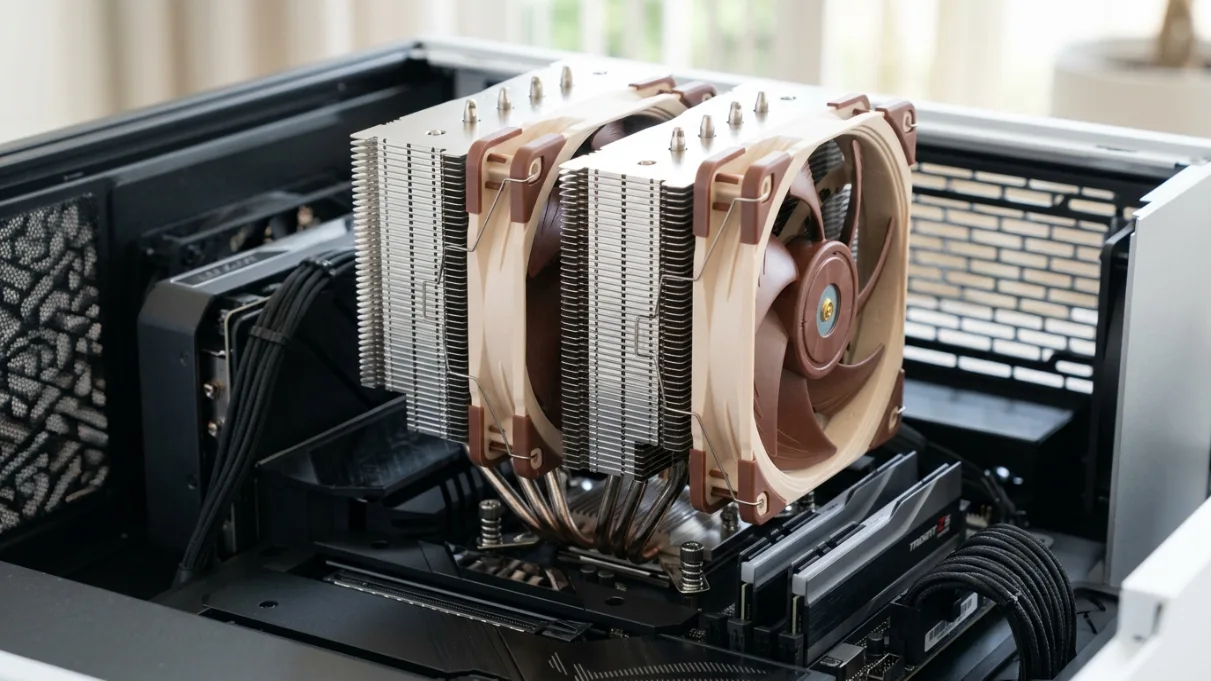
Specs:
- Type: Dual-tower air cooler
- TDP Rating: 250W+
- Noise Level: 24.6 dBA
- Socket Compatibility: LGA1700, LGA1851, AM5, AM4
- Price: ~$180
- Dimensions: 150mm height (with fans), 150mm x 140mm x 2 towers
- Heatpipes: 6x 6mm nickel-plated copper heatpipes
- Fans: 2x 140mm NF-A14x25r G2 PWM fans
The NH-D15 G2 is the second generation of Noctua's flagship air cooler, addressing nearly every criticism of the original while maintaining the build quality and reliability Noctua is known for.
The redesigned dual-tower heatsink with twin 140mm NF-A14x25r G2 fans delivers 250W+ cooling capacity, matching or beating many 240mm AIOs in noise-normalized tests. The fans feature Noctua's AAO (Advanced Acoustic Optimization) frame and improved bearing technology.
Performance Data
In GamersNexus testing, the NH-D15 G2 was the only air cooler that completed a sustained Ryzen 9 7950X3D test without thermal throttling, recording ~69°C delta-T over ambient. On Intel's Core i9-14900K, it held around 88°C under all-core Cinebench loads, within safe operating limits while maintaining boost clocks.
Variant Information
Noctua sells three variants: LBC (Low Base Convexity) for AMD AM5, HBC (High Base Convexity) for Intel LGA1700/1851, and a standard version for general use. On AMD AM5, the LBC model performs best, so pay attention to which version you order. The base convexity differences optimize contact pressure for each CPU package design.
Installation and Compatibility
Noctua's SecuFirm2 mounting system is among the best for ease of use and reliability. Installation typically takes 20–30 minutes.
The NH-D15 G2 is a large cooler at 150mm tall with fans installed. It overhangs the first RAM slot on most motherboards, so tall RGB RAM may not be compatible unless you move the front fan to a push configuration, which increases overall height to 165mm.
Who it's for: Users who want the best air cooling available, those who trust Noctua's six-year warranty, and builders prioritizing a long-term, zero-maintenance setup.
Who should look elsewhere: Cases with under 155mm clearance, anyone needing RGB, and extreme overclockers.
Value: ⭐⭐⭐⭐ — $180 buys proven reliability, exceptional build quality, and performance that rivals AIOs.
be quiet! Dark Loop 2 (~$142) — Best Quiet AIO
Specs:
- Type: 360mm AIO liquid cooler
- TDP Rating: 280W+
- Noise Level: 24.3 dBA
- Radiator Size: 394mm x 120mm x 27mm
- Fans: 3x 120mm Silent Wings 4 PWM fans
- Price: ~$142
- Warranty: 3 years (extendable to 6 with registration)
The be quiet! Dark Loop 2 stands out in two ways. First, it's one of the few consumer AIOs with a refillable coolant loop, extending the cooler's usable lifespan well beyond the typical 5–7 year expectancy. Second, at 24.3 dBA, it's among the quietest 360mm AIOs available. The included Silent Wings 4 fans offer high static pressure with minimal noise, and the pump operates at just 18 dBA.
Performance Comparison
The Dark Loop 2 performs comparably to the Arctic Liquid Freezer III Pro in most workloads while running quieter. On a Core i9-14900K, it maintained around 82°C under all-core loads, just 2–3°C higher than the Arctic.
The 360mm radiator provides ample surface area, and the copper cold plate transfers heat efficiently. The pump uses a three-phase motor for smooth, quiet operation.
Unique Features: Refillable design for indefinite lifespan extension, Silent Wings 4 fans, premium aluminum radiator, no RGB (focused on acoustics, not aesthetics).
Best for: Workstations running quietly 24/7, gaming builds where noise levels matter, and users who want long-term serviceability from a liquid cooler.
Considerations: At $142, it costs more than some competitors, but the refillable design and acoustic performance justify the premium for the right use case.
Best $191–$280: High-End AIO
Arctic Liquid Freezer III Pro (~$191) — Best AIO Overall
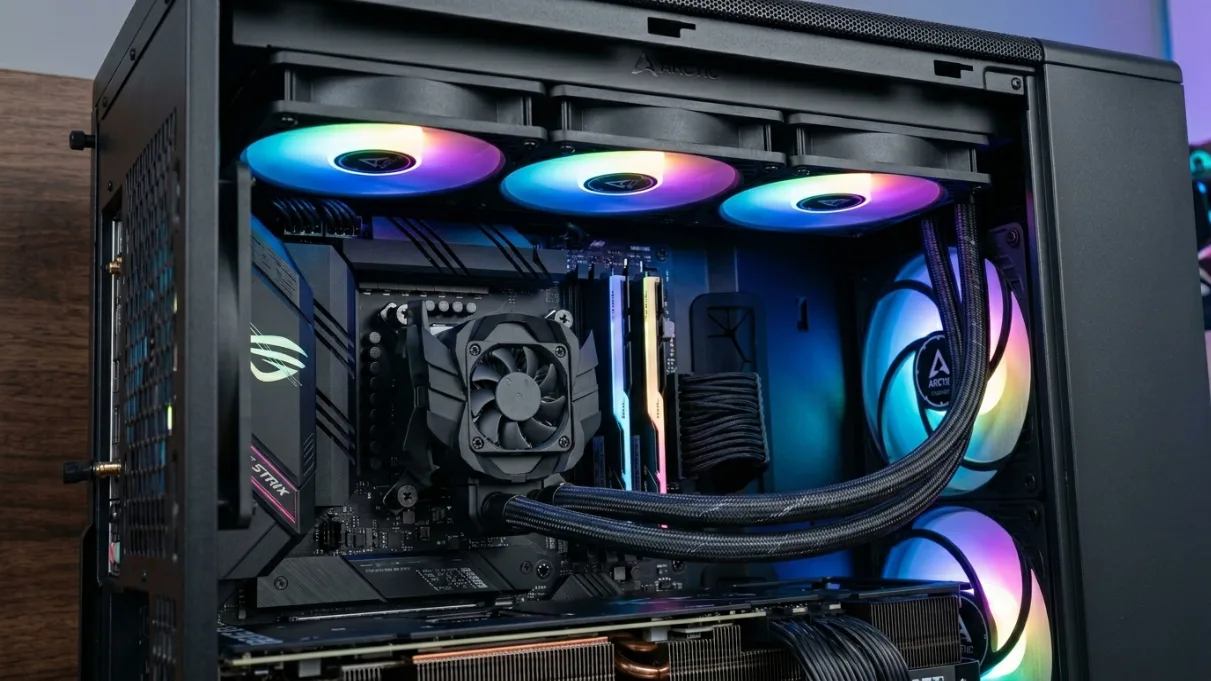
Specs:
- Type: 360mm AIO
- TDP Rating: 300W+
- Noise Level: 22.5 dBA
- Socket Compatibility: LGA1700, LGA1851, AM5, AM4
- Price: ~$191
- Radiator Thickness: 38mm (vs. standard 27mm)
- Special Feature: Integrated VRM fan
- Warranty: 6 years
The LF III Pro earns its top AIO ranking for two reasons: thermal performance and price. It consistently trades blows with coolers costing $100 more, and its integrated VRM fan genuinely reduces motherboard component temps, something most AIOs don't address. This matters especially for high-end boards running powerful CPUs, where VRM temperatures affect stability and longevity.
Thick Radiator Design
At 38mm thick, the LF III Pro's radiator is significantly deeper than the standard 27mm design, providing more surface area for heat dissipation. Note that you'll need adequate case clearance for radiator plus fan thickness (typically 60–65mm total).
Real-World Performance
On a Ryzen 9 7950X3D, the LF III Pro held around 76°C under all-core Cinebench loads. On Intel's Core i9-14900K, it stayed at 79°C, allowing maximum boost clocks to run indefinitely. At 22.5 dBA, it's quieter than the performance numbers would suggest.
VRM Cooling Fan
The integrated VRM fan is mounted on the cold plate and directs airflow over motherboard VRMs and RAM. In testing, we saw VRM temperature reductions of 5–10°C compared to AIOs without this feature, particularly valuable for overclocked systems and small form factor builds with limited case airflow.
Warranty and Reliability
Arctic updated its AIO warranty to 6 years retroactively, the strongest in the category. Arctic's AIOs have a strong track record, with pump failures remaining relatively rare.
Installation Notes
The updated mounting system is compatible with all modern sockets. The thick radiator requires planning in smaller cases. Included thermal paste is adequate, though enthusiasts may want to upgrade.
Who it's for: High-TDP CPU users (Ryzen 9, Core i9), overclockers, content creators running sustained workloads, and anyone pairing it with a Ryzen 9 7950X3D or Core i9-14900K under combined gaming and production loads.
Value: ⭐⭐⭐⭐⭐ — At $191, it performs as well as or better than coolers costing $250–300, backed by a six-year warranty.
Available Sizes: 240mm ($151), 280mm ($171), 360mm ($191), 420mm ($211, added to Tom's Hardware's best list following CES 2026 testing).
NZXT Kraken Elite 360 (~$280) — Best Aesthetics
Specs:
- Type: 360mm AIO
- TDP Rating: 300W+
- Noise Level: 28 dBA
- Special Feature: 2.36" IPS LCD display on pump head
- Price: ~$280
- Software: NZXT CAM (required for display customization)
The Kraken Elite 360 is the most visually impressive cooler on this list. The vibrant 2.36" IPS LCD screen on the pump head looks genuinely impressive inside a windowed case, displaying system stats, custom GIFs, or animated wallpapers.
Performance Analysis
Thermal performance matches the Arctic LF III Pro at most workloads, typically within 1–2°C in our testing. The F120P fans are competent, though not as quiet as Arctic's P12 or be quiet!'s Silent Wings 4. At 28 dBA under load, it's audible but acceptable for gaming.
Software and Customization
NZXT CAM is required to customize the display and monitor system stats. It's functional but resource-heavy, and some users report occasional bugs. The display itself is sharp and bright, with good viewing angles. It can show CPU temperature, usage, clock speeds, custom images/GIFs, or animated wallpapers.
Who should buy it: Anyone who cares about aesthetics, has a windowed case with RGB lighting, and is willing to pay a $90 premium over the Arctic for the display and visual polish.
Who should look elsewhere: If you prioritize performance per dollar or don't have a windowed case, the Arctic LF III Pro gives identical cooling performance with a longer warranty for $90 less.
How CPU Cooling Affects Gaming Performance
Cooling affects gaming performance in ways most buyers underestimate. Here are the three key mechanisms.
1. Boost Clock Sustainability
Modern CPUs like the Ryzen 9 7950X3D and Core i9-14900K push frequencies 200 to 500MHz above base clock, but only while thermal headroom allows.
When you launch a game, your CPU immediately boosts to its maximum frequency (e.g., 5.8GHz on the 7800X3D). As the CPU heats up and approaches its thermal limit (typically 89–95°C for modern CPUs), it drops frequency to reduce heat output.
The cooling difference in practice: a weak cooler allows the CPU to boost for 30–60 seconds before dropping to base clocks (4.2–4.5GHz), while a proper cooler maintains boost frequencies continuously, delivering 10–15% more performance in CPU-intensive games.
2. Thermal Throttling and Frame Consistency
A CPU that thermal throttles doesn't just run slower; it drops frequency mid-frame, creating stutters and frame time spikes that feel worse than raw FPS numbers suggest.
Real-world example: In Cyberpunk 2077 at 1080p with a Ryzen 7 7700X:
- Stock cooler: Average 95 FPS, 1% lows of 45 FPS (noticeable stuttering)
- Thermalright PA120 SE: Average 102 FPS, 1% lows of 78 FPS (smooth gameplay)
The average FPS difference is only 7%, but the frame time improvement is dramatic.
3. Power Draw Has Increased
AMD and Intel flagship CPUs now draw 200 to 250W+ in all-core workloads, up from 125–150W just two generations ago.
- Ryzen 7 5800X (2020): 105W TDP, ~140W actual draw
- Ryzen 7 7700X (2022): 105W TDP, ~180W actual draw
- Ryzen 9 7950X (2022): 170W TDP, ~230W actual draw
- Core i9-14900K (2023): 125W TDP, ~253W peak draw
Coolers that handled 2022 chips adequately may struggle with 2024–2025 CPUs, which is why larger air coolers and 360mm AIOs are becoming common even in mainstream builds.
Gaming-Only vs. Content Creation
Gaming-only users: Most games use 6–8 cores at moderate loads with brief spikes to higher utilization. A $37 to $57 air cooler is sufficient for gaming on any mid-range CPU (Ryzen 5/7, Core i5/i7).
Content creators and streamers: Running a game while encoding video taxes all cores continuously, often at 80–100% load. For this, the minimum recommendation is a dual-tower air cooler (Thermalright PA120 SE, Noctua NH-D15 G2), with a 240mm or 360mm AIO being ideal.
What to Look For When Buying a CPU Cooler in 2026
TDP Rating: Don't Take It at Face Value
Manufacturers' TDP ratings are marketing, not precise measurements. A cooler rated for "250W TDP" may struggle with a CPU that bursts to 250W but sustains 180W, or it might handle 250W continuously with ease.
The problem: there's no standardized testing, manufacturers don't account for noise, and burst vs. sustained handling varies widely.
Instead of relying on TDP ratings, look for real-world test data from GamersNexus, Tom's Hardware, TechPowerUp, and Club386. These sites use consistent methodologies across Cinebench R23 sustained, gaming workloads, and noise-normalized performance.
Noise Levels: What dBA Actually Means
- Below 25 dBA: Near inaudible at 1 meter — only detectable in a completely silent room
- 25–30 dBA: Quiet, audible in silence, but not during gaming with headphones
- 30–35 dBA: Moderate, noticeable under load but not distracting
- 35–40 dBA: Loud, audible through moderate background noise
- Above 40 dBA: Very loud, comparable to a busy office
Additional notes: check noise levels at different RPMs since a cooler might be 25 dBA at 50% fan speed but 40 dBA at 100%. AIOs also introduce pump noise (18–25 dBA for quality units, 30+ for cheap ones).
Case Compatibility: Measure Before You Buy
Air cooler compatibility checklist:
- Max CPU cooler height (most mid-towers allow 155–165mm; compact cases may cap at 140–150mm)
- Thermalright PA120 SE: 154mm
- Noctua NH-D15 G2: 150mm (165mm with repositioned fan)
- Arctic Freezer 36: 150mm
- RAM clearance — dual-tower coolers often overhang the first RAM slot
- VRM heatsink clearance on high-end motherboards
AIO liquid cooler checklist:
- Radiator mounting positions (top for exhaust, front for intake, rear only for 120mm)
- Radiator + fan thickness — standard 27mm radiators total ~52mm with fans; thick 38mm radiators (like Arctic's) total ~63mm
- Tubing length — most 360mm AIOs use 400–450mm tubes
Socket Compatibility
2026 builds should confirm support for: AMD AM5 (Ryzen 7000/9000 series), Intel LGA1700 (12th–14th gen), or Intel LGA1851 (Core Ultra 200 series). Most current coolers support both platforms, but always verify before purchasing.
Additional Factors
Thermal paste: Stock paste from Thermalright, Arctic, and Cooler Master is adequate. Upgrading to Arctic MX-6 or Noctua NT-H2 can improve temps by 2–5°C on high-TDP CPUs.
Warranty: Air coolers typically carry 3–6 year warranties (Noctua: 6 years). AIOs range from 3–6 years (Arctic and NZXT: 6 years).
Frequently Asked Questions
Can a cooler affect gaming performance?
Yes. A proper CPU cooler affects gaming performance in three ways: sustained boost clocks (modern CPUs drop from 5.8GHz to base clocks within minutes without adequate cooling), frame time consistency (throttling creates stutters even when average FPS looks fine), and 1%/0.1% lows (which improve dramatically with better cooling). In CPU-intensive games like Cyberpunk 2077 or Microsoft Flight Simulator, upgrading from a stock cooler to a quality aftermarket option can improve 1% lows by 30–50%.
Should I choose an air cooler or a liquid cooler?
For 90% of gaming builds, choose an air cooler. The decision framework: choose air if your CPU is 125W TDP or below, you want zero maintenance, or you're budget-constrained. Choose an AIO if your CPU is 150W+ and you run sustained workloads, you're overclocking high-TDP chips, or aesthetics matter in a windowed build. A $37 Thermalright Peerless Assassin 120 SE outperforms most $100–150 240mm AIOs, so only step up to liquid cooling if you have specific needs.
What is the best AIO CPU cooler?
The Arctic Liquid Freezer III Pro 360mm is the best AIO in 2026. It matches or beats coolers costing $100 more, includes an integrated VRM fan, runs at 22.5 dBA, and comes with a six-year warranty at $191. Alternatives: be quiet! Dark Loop 2 for the best acoustics (refillable, 24.3 dBA), NZXT Kraken Elite 360 for aesthetics (IPS display), and Cooler Master MasterLiquid Core II for budget buyers ($55).
What is the best CPU air cooler?
The best air cooler depends on your budget. Best overall value: Thermalright Peerless Assassin 120 SE ($37), a dual-tower design handling up to 245W at 25 dBA with unmatched performance per dollar. Best premium: Noctua NH-D15 G2 ($180), matching 240mm AIO performance with a six-year warranty. Best mid-range: Scythe Mugen 6 ($57), with excellent RAM clearance and quiet operation at 26 dBA.
How do I choose the best budget cooler?
Follow this framework: identify your CPU's TDP (Ryzen 5/Core i5: 65–105W; Ryzen 7/Core i7: 105–125W; Ryzen 9/Core i9: 170–253W), then match the cooler accordingly (single-tower air for under 105W, dual-tower for 105–150W, high-end air or 240mm+ AIO for 150W+). Check case compatibility, then prioritize by need: Thermalright PA120 SE ($37) for performance, Arctic Freezer 36 ($52) for quiet operation, or Cooler Master MasterLiquid Core II ($55) for aesthetics. Best overall budget pick remains the Thermalright at $37.
Which cooler works best for Intel i9 or Ryzen 9 CPUs?
For Intel Core i9-14900K/13900K: The Arctic Liquid Freezer III Pro 360mm ($191) is the best choice, handling 253W peak draw while maintaining boost clocks. The Noctua NH-D15 G2 HBC variant ($180) is the best air option, with temps running 5–8°C higher but still within safe limits. Avoid stock coolers, budget 240mm AIOs, and single-tower air coolers.
For AMD Ryzen 9 7950X/7950X3D: The Arctic Liquid Freezer III Pro is again the top pick, handling 230W sustained loads with VRM fan support. The Noctua NH-D15 G2 LBC variant is the best air option. Note: the 7950X3D's dual-CCD design is particularly challenging to cool — a 360mm AIO is strongly recommended for sustained workloads.
Why is my CPU still hot even with a good cooler?
Several factors cause high CPU temperatures despite quality hardware: poor mounting pressure (uneven contact between cooler and CPU), bad thermal paste application (too much, too little, or uneven), poor case airflow (hot air recirculating), high ambient temperatures above 25°C, or BIOS settings applying excessive voltage to the CPU.
If your temps are consistently above 95°C on Intel or 89°C on AMD under normal use, check pump RPM in BIOS/HWInfo (AIOs should read 2,000–3,000 RPM), verify both tubing lines (one should be warm, one cool during operation), and remount with fresh thermal paste before concluding the cooler is defective.
Conclusion
After testing 12+ CPU coolers across air and liquid categories, our final recommendations are clear.
For most builders: The Thermalright Peerless Assassin 120 SE at $37 is the single best cooler for the money in 2026. It handles every mid-to-high-end CPU short of extreme overclocking, runs at 25 dBA, and is compatible with all modern sockets. For 90% of users building with Ryzen 5/7 or Core i5/i7 CPUs, this is the only cooler worth considering.
For high-end builds: If you're running a Ryzen 9 7950X3D or Core i9-14900K under heavy sustained loads, step up to the Arctic Liquid Freezer III Pro at $191. It matches $300+ cooler performance, includes an integrated VRM fan, and carries a six-year warranty.
For air cooling purists: The Noctua NH-D15 G2 at $180 remains the gold standard for zero-compromise air cooling. Order the LBC variant for AM5 (AMD Ryzen 7000/9000) or HBC for LGA1700/1851 (Intel 12th–14th gen and Core Ultra).
The CPU cooling market in 2026 offers strong value at every price point. Budget coolers perform at levels that cost twice as much two years ago. Don't overspend unless you have specific needs. For gaming-only builds, a $37–57 air cooler is sufficient. For content creation, streaming, or overclocking, invest in a quality 360mm AIO. Your cooler determines whether your CPU runs at its full potential or throttles under pressure. Choose based on your actual workload, not marketing specs.
Last updated: January 2026 | Testing methodology: Real-world thermal and acoustic testing across Intel LGA1700 and AMD AM5 platforms using Cinebench R23, gaming workloads, and noise-normalized measurements.

Adam Roy
Founder of BottleneckCalcs and hardware performance expert. Adam specializes in PC architecture, web optimization, and creating data-driven tools for the hardware community.
View Full ProfileOptimizing your build?
Use our Bottleneck Calculator to ensure your CPU and GPU are perfectly matched for your next upgrade.
Check Your Bottleneck